
Revolutionizing Construction Compliance: The Launch of eComply FieldReporter

Despite the risks, construction compliance has long relied on paper-based daily logs for tracking employees’ attendance on the jobsite.

Lost or incomplete records create administrative headaches, gaps in oversight, and make it harder to resolve issues when questions arise. For agencies and contractors on publicly funded projects, daily employee attendance logs are essential, yet the continued reliance on paper sign-in sheets severely compromises both transparency and accountability.

B2Gnow delivers the highly-anticipated solution with eComply FieldReporter, a mobile module that brings labor compliance directly to the jobsite. It replaces manual sign-in sheets with a secure digital kiosk that captures real-time employee sign-in and out digitally at the source, reducing unauthorized entries and eliminating illegible handwriting issues. The result is accurate, verifiable electronic records that support agency oversight and help contractors stay aligned with labor requirements throughout the project.

The High Cost of Manual Processes

Relying on paper-based data collection creates inefficiency and risk across a project.

  • Human Error: Manually entering handwritten notes and sign-in sheets into a computer is a slow, error-prone process.
  • Missed Discrepancies: If site data does not match the Certified Payroll Report (CPR), penalties may result if not caught immediately.
  • Fraud Risks: Manual logs make it easier for employees to sign in or out for others or record incorrect hours.
  • Administrative Burden: Jobsite managers lose time typing handwritten data into spreadsheets instead of managing the project directly.

Meet eComply FieldReporter: Your Onsite Digital Solution

The eComply FieldReporter module replaces outdated tools with a secure, mobile-friendly application that tracks worker activity in real time. Part of the B2G suite of solutions, eComply provides a unified system that connects the field to the back office.

Labor compliance is shifting from retrospective reporting to proactive monitoring. FieldReporter supports this shift by providing verified electronic data from the source, ensuring accurate payroll entries and automatically flagging discrepancies against CPRs.

Key Features That Drive Compliance

FieldReporter is built to handle the complexities of large-scale construction sites and multiple jobsites simultaneously.

  • Mobile Kiosk and Digital Sign-In: Onsite managers use a 4-digit PIN to activate a kiosk-style interface on a mobile device for employee check-ins.
  • Worker Identification: Employees sign in using the last four digits of their SSN.
  • Validation and Verification: To confirm their identity and prevent fraudulent sign-ins, employees capture a selfie photo when checking in.
  • Geolocation Technology: The system captures exact latitude and longitude coordinates, allowing contractors to verify that employees are on the project site.
  • Real-Time Discrepancy Alerts: The module is fully integrated with eComply to notify the General Contractor by email if digital sign-in data does not match the CPR.
  • Security and User Access: Role-based access control by project or contractor protects sensitive data and complies with data protection regulations.

Tangible Benefits for Construction Teams

By digitizing daily activities, agencies and contractors can transform operations.

  • Enhances Efficiency: Saves time and eliminates duplicate data entry and paper logs.
  • Improves Accuracy: Automating data collection and employee verification minimizes errors and ensures accurate payroll entries.
  • Reduces Administrative Effort: Streamlined workflows let staff focus on higher-value tasks rather than on manual filing.
  • Ensures Accountability: Provides a verified account of daily activities, including hours and job roles.
  • Monitors Utilization: Workforce usage is compared against project goals in real time, with discrepancies flagged immediately for the contractor.
  • Audit Readiness: All data is available and attached to the project, providing evidentiary data for audits or legal proceedings.

Secure, Scalable, and Seamless

FieldReporter is a web-based SaaS solution accessible via browser on tablets, laptops, and smartphones. It is a fully integrated add-on module that syncs in real time with the eComply solution, making it easy to track progress and prepare for audits with all documentation at your fingertips. Whether documenting project status, staffing, or resources used, FieldReporter ensures your data is audit-ready from day one.

Protect your project from compliance risks and eliminate time-consuming manual data entry with eComply FieldReporter. By digitizing onsite activity, this solution saves you administrative time and automates discrepancy alerts, ensuring every record is audit-ready.

Take the next step toward digital accuracy today.

Ready to see how modern solutions can transform your compliance process? Learn more and schedule a demo to discover how eComply can help your organization streamline compliance, reduce risk, and stay audit-ready.
Davis-Bacon vs. Prevailing Wage: Understanding the Connection and Key Differences

In public infrastructure, maintaining labor compliance is a complex yet critical responsibility. Two key wage frameworks guide this effort: the federal Davis-Bacon Act and state or local prevailing wage laws. Both protect workers and promote fair compensation, but they operate under different regulatory requirements that can affect project management and reporting.

For agencies and contractors, understanding the nuances between federal and state prevailing wage requirements is more than a matter of terminology. It is essential for mitigating risk, protecting public funds, and ensuring every worker is paid fairly for their craft.

To help you navigate these requirements, we have outlined the key differences, compliance rules, and best practices for staying ahead.

Davis-Bacon vs. Prevailing Wage: What’s the Difference?

While the terms are often used interchangeably, they are not identical. The Davis-Bacon Act is the federal law that establishes prevailing wage requirements for covered federal construction projects. The term “prevailing wage” more broadly refers to wage standards set by federal, state, or local authorities to ensure workers on public projects are paid at least locally established rates. Understanding how the Davis-Bacon Act fits within the broader prevailing wage framework is the first step to keeping a project compliant and audit-ready.

What the Davis-Bacon Act Is and How It Works

Enacted in 1931, the Davis-Bacon Act (DBA) requires payment of locally prevailing wages as determined by the U.S. Department of Labor on public works projects. Contractors and subcontractors working on federal or District of Columbia contracts over $2,000 for construction, alteration, or repair of public buildings or works must pay laborers and mechanics at least the prevailing wages and fringe benefits in the local area.

What “Prevailing Wage” Means in Public Projects

In public infrastructure, a prevailing wage is the hourly base rate and required fringe benefits paid to workers in a specific area for a type of work. The U.S. Department of Labor sets these rates for federal projects, while states set rates for state-funded work. The intent of the Davis-Bacon Act’s prevailing wage system (and its state and local counterparts) is to ensure public contracting does not drive down local wages.

When Davis-Bacon Applies vs. When Prevailing Wage Applies

Which requirements apply usually depends on the funding source:

  • Davis-Bacon Act: Applies to direct federal contracts where federal agencies provide financial assistance through grants, loans, or guarantees. There are also “Related Acts” (e.g., Contract Work Hours and Safety Standards Act, Copeland Anti-Kickback Act, etc.) that ensure fair labor standards are met on these federal contracts.
  • State Prevailing Wage: Many states have their own “Little Davis-Bacon” laws. These apply when a project is funded by state, county, or municipal entities.
  • Overlapping Coverage: On projects with mixed state and federal funding, contractors often compare prevailing wage and Davis-Bacon rates and pay the higher to comply with both laws.
How Wage Rates Are Calculated Under Each System

Wage determinations are based on surveys by the applicable labor department for similar work in the area. Federal wage determinations are divided into four categories: Building, Residential, Highway, and Heavy construction. Each lists the specific hourly rate and required fringe benefit for each labor classification.

Since these rates can change or include predetermined increases, a cloud-based solution like eComply, supported by a dedicated team that monitors and automatically updates wage rates, reduces the manual effort to track changes and helps prevent payment errors.

Contractor Requirements and Compliance Rules

Compliance involves more than issuing a paycheck. Contractors must follow strict rules regarding:

  • Worker Classification: Ensuring every person on site is classified correctly according to the work they are actually performing.
  • Apprentice Ratios: Using apprentices is permitted only if they are registered in an approved program and if specific ratios to journeyworkers are maintained.
  • Weekly Payment: Under federal Davis-Bacon requirements, workers must be paid weekly, regardless of the contractor’s payroll cycle.
Documentation, Reporting, and Certification Requirements

At the center of labor compliance is the Certified Payroll Report (CPR). On federally funded projects, contractors must submit weekly reports detailing work classification, hours worked, and actual wages paid to each employee. These reports must be accompanied by a signed Statement of Compliance. Modern platforms like eComply streamline this by providing automated CPR analysis, checking for errors or omissions as soon as a contractor submits.

Common Penalties for Wage Violations

The consequences of failing to meet Davis-Bacon vs. prevailing wage requirements are significant. Penalties include:

  • Withholding of Contract Payments: Agencies can stop payments to the prime contractor until underpayments are resolved.
  • Contract Termination: Serious or repeated violations can result in the immediate cancellation of the contract.
  • Debarment: Contractors found in willful violation may be prohibited from bidding on any government contracts for up to three years.
How to Determine Which Rule Applies to Your Project

Determining the governing rule starts with the bid documents. The awarding agency is responsible for including the correct wage determination in the contract. However, contractors must perform due diligence. If the project receives federal assistance, even if administered by a state agency, Davis-Bacon requirements may apply. Using a centralized compliance solution helps agencies and contractors keep all relevant determinations and contract documents in one audit-ready location.

Why Understanding These Wage Laws Matters for Contractors and Workers

For workers, these laws guarantee a fair day’s pay and protect their standard of living. For contractors, understanding prevailing wage vs. Davis-Bacon creates a level playing field. It ensures no one wins a bid by undercutting local labor standards. Robust compliance, supported by real-time oversight tools, helps deliver higher quality construction, reduces legal risk, and ensures public infrastructure projects are built on a foundation of integrity.

Summary: Navigating Labor Compliance

Whether a project is governed by the Davis-Bacon Act or state-level prevailing wage laws, the objective is the same: protecting public funds and ensuring fair compensation. As infrastructure projects grow in complexity, managing these shifting requirements requires more proactive management. By staying informed on the differences between prevailing wage and Davis-Bacon and using modern tools to automate validation, agencies and contractors can turn compliance from an administrative burden into a strategic advantage.

Take the Next Step in Compliance Excellence

Is your team still manually reviewing paper payrolls or struggling to track changing wage determinations? Do not let a small oversight lead to costly penalties or project delays. Discover how eComply can streamline your labor compliance program with automated wage validation, real-time field oversight, and audit-ready reporting.

Contact our team today to learn how we can help you simplify the complexities of Davis-Bacon and prevailing wage compliance.

Prevailing Wages in California: Key Pitfalls, Penalties & How to Stay Compliant

With billions of dollars in public works funding on the line, California’s prevailing wage requirements remain one of the most closely watched areas of labor compliance. The State’s  “Little Davis-Bacon” law ensures that workers on public projects are paid fairly, but compliance can be complicated. From tracking multiple trades to verifying accurate classifications and pay rates, a single oversight can lead to costly findings. Staying compliant today involves more than just meeting minimum requirements. It requires an understanding of the three P’s: Pitfalls, Penalties, and Protection.

Common Pitfalls in Prevailing Wage Compliance

Even experienced teams can overlook details. For contractors, mistakes often start with applying the wrong prevailing rate, whether through misclassification of the worker, an incorrect wage determination, or failure to include a predetermined increase. For agencies, awarding bodies, and project owners, issues arise when certified payroll reports (CPRs) aren’t carefully reviewed due to time constraints or staffing shortages.

Common mistakes include:
  • Missing, incomplete, or inaccurate CPR submissions from contractors and subcontractors
  • Insufficient on-site checks of classifications and hours worked
  • Poor documentation of approvals, rejections, and corrective actions

These vulnerabilities present risks for both contractors and project owners, who could be held responsible for permitting noncompliant work to continue unchecked.

Penalties for Violating Prevailing Wages in California

The Department of Industrial Relations’ (DIRs’) increased use of electronic data and unexpected audits allows for quicker detection and more thorough investigation of violations.

Consequences may include:

  • Financial liabilities, such as repayment of back wages, penalties, and liquidated damages
  • Operational setbacks like withheld payments, stop-work orders, or project delays
  • Damage to reputation for agencies, where noncompliance findings can threaten public trust and future funding opportunities

Repeated violations can even lead to contractor debarment, blocking participation in future public works projects. For both agencies and contractors, the real cost of noncompliance often lies in lost time, damaged credibility, and missed opportunities.

How to Strengthen Your Prevailing Wage Compliance Process

The best way to prevent costly mistakes is a proactive compliance approach that includes clear processes, training, and technology.

Recommended best practices include:

  • Regularly reviewing CPRs to verify wage rates, apprentice ratios, and fringe benefits
    Conducting employee interviews to ensure reported CPRs accurately reflect the actual work performed
  • Keeping a complete audit trail of payroll submissions, communications, and corrective actions
  • Utilizing technology solutions like eComply to automate reviews, identify areas of non-compliance, streamline document management, and interface directly with the DIR’s Public Works Website Services online portal

A comprehensive labor compliance solution can provide automated CPR analysis using current DIR wage determinations, along with field inspection tools and configurable dashboards that give real-time visibility into compliance status across all projects.

Quick Checklist for California Prevailing Wage Compliance

Before certifying payroll or approving payments, verify the following:

  • The correct prevailing wage determination is applied to each trade and craft
  • All contractors and subcontractors are registered with the DIR
  • CPRs are submitted, reviewed, and approved weekly
  • Apprenticeship standards and ratios are properly maintained
  • Field inspections and worker interviews confirm reported classifications and payments
  • All documentation—CPRs, approvals, and correspondence—is stored in a single centralized location system
Staying Ahead of Changing Prevailing Wage Requirements

California’s prevailing wage requirements will continue to evolve, and compliance expectations may grow more rigorous in the coming years. By recognizing the pitfalls, understanding the penalties, and investing in the right protections, agencies and contractors can keep projects compliant, transparent, and on schedule. Modern compliance tools, such as eComply, offer the automation and oversight needed to achieve this, reducing human error, enhancing accountability, protecting public funds, and ensuring every worker is paid fairly for their work.

Request a demo to learn how eComply can help your organization stay ahead with streamlined compliance and automation.

Stay Compliant, Efficient, and Audit-Ready Under the New Interim Final Rule (IFR)

In October 2025, the U.S. Department of Transportation (USDOT) issued an Interim Final Rule (IFR) that changes how Disadvantaged Business Enterprise (DBE) and Airport Concession DBE (ACDBE) programs are managed. Agencies must now adhere to these new requirements.

The new directive is challenging and complex to navigate. However, with clear steps, agencies can keep programs on track. B2Gnow is committed to helping customers protect program initiatives and maintain funding and participation goals during this transition.

With more than 25 years of experience helping organizations adapt to changing regulations, B2Gnow provides the guidance, tools, and ongoing support needed to stay compliant and keep programs running smoothly.

The Immediate Impact: What the IFR Requires

The new IFR removes the Socially and Economically Disadvantaged Owner (SEDO) presumption based on race and/or sex, requires each business owner to demonstrate individual Social and Economic Disadvantage (SED) status without regard to race and sex, and adds strict rules for program management.

All DOT-funded recipients need to address these new requirements:

  • Race and Sex Presumptions Removed: The IFR removes the assumption of disadvantage based on race or sex. Now, everyone seeking certification must provide individual proof of SED.
  • Mandatory Re-evaluation: Every Unified Certification Program (UCP) must re-evaluate all currently certified DBEs and ACDBEs.
  • Counting and Goal Credit: The IFR requires individualized re-evaluations of currently certified firms, and recipients should not count firms for DBE/ACDBE goal credit where certification relied on the now-disallowed race/sex presumptions until the UCP completes re-evaluation. USDOT guidance also notes that contracts executed before October 3, 2025, do not automatically require amendment, but whether a firm’s participation can be counted for DBE credit depends on the outcome of the re-evaluation process. 
  • Increased Documentation and Audit Oversight: The new SED requirements mean agencies must keep detailed records and have a clear, auditable compliance process for federal and state reviewers, including continued tracking of prompt payments and documentation for subcontractor terminations/removals.
B2Gnow’s Approach to IFR Implementation

With decades of experience and proactive system development, B2Gnow can help your agency stay in compliance with IFR requirements.

  • Our Track Record: Throughout our 25+ year history, B2Gnow has supported organizations through numerous rule updates and related system impacts. We are here to support you during this IFR and are committed to updating your systems as needed to keep your organization compliant. 
  • Our Approach: We quickly identify all system impacts and communicate our plan through clear documentation and live review sessions. Our current solution, with its recent updates, already supports the majority of the requirements in the new rules.
  • Proven Leadership in an Evolving Landscape: Managing federal compliance is complex, and the regulatory landscape is constantly shifting. As the trusted experts organizations depend on to navigate these changes, B2Gnow has already successfully supported programs with race- and sex-neutral standards in states such as Texas, Arizona, and Florida. This extensive, proven experience shapes our approach to nationwide implementation, ensuring your program stays protected as requirements evolve.
Strategic System Solutions: How B2Gnow Safeguards Your Program Integrity

To help you manage the IFR, B2Gnow offers system solutions that keep your program compliant and running smoothly.

  1. Mastering Certification & Re-evaluation
  • Integrated Re-evaluation Intake: We have developed and deployed a streamlined re-evaluation application that prompts firms to submit only the new IFR-required documents: the Personal Narrative (PN) and Personal Net Worth (PNW) Statement.
  • Digital Audit Assurance: We also use a dedicated re-evaluation-tracking feature and standard audit questions to keep the SED review process consistent and thorough. For customers using the PNW module, the system digitizes the entire process, eliminates handwriting errors, and automatically calculates financial totals. 

2. Controlling Counting & Goal Suspension

  • Program Suspension/Resumption: B2Gnow has developed a database script that allows our clients, on request, to make specific and targeted updates to contracts with federal funding – essentially allowing the firms that are indicated as for-credit to be placed on pause, and that agencies must document the pause and why it was made. Once the directory re-evaluation is complete, the firms can again be counted for credit on active contracts. 
  • Flexible Payment Control: If clients choose a more manual approach, our standard contract compliance audit tools allow users to adjust a firm’s for-credit payment status on a contract-by-contract, payment-by-payment basis, making it simple to pause counting for as long as needed and then easily resume, while still maintaining the primary components of reported data: payments, confirmations, and payment timing.

3. Reporting & Audit Readiness

  • Audit-Proof Data Management: B2Gnow keeps all documentation in one place, which is important for DOT, FAA, and FTA program reviews. Our system’s configurable options make it easy to track IFR-related decertifications and clearly distinguish them from other directory removals.
  • Compliance Reporting and Forms: We provide the fields you need to show which firms are re-evaluated, pending, or non-responsive. We will add support for the updated Uniform Certification Application, the Personal Net Worth (PNW) statement fields, and any revised reporting fields or semi-annual report formats as USDOT publishes them. 

4. Orchestrating Communication & Change Management

  • Proactive Partner Guidance and Outreach: We keep customers informed with timely updates on regulatory changes through the system dashboard and email, host educational webinars, and share our plans in documentation and live review sessions. We also use advanced outreach tools to connect with specific certified groups and share documentation requirements.
  • Mandatory Public Transparency: For customers who submit an IFR System Intake form, B2Gnow can request configuration updates, such as adding standard disclaimers to all vendor-facing portals and public directories to let users know that certification is suspended and re-evaluation is underway. We can also add an indicator to certified directories to show which firms have been re-evaluated under the IFR.
Protecting Your Program: Compliance and Efficiency with B2Gnow

The IFR brings a period of intense administrative work. Agencies must follow the new certification standards and maintain fully auditable compliance records throughout the complex suspension and re-evaluation period.

B2Gnow is your essential partner because we provide both compliance and continuity:

  • Proven Reliability: B2Gnow is the most trusted platform for managing federal program requirements, trusted by over 30 State DOTs and more than 90 airports and transit authorities.
  • Audit Defense: When federal rules shift, B2Gnow delivers the essential, reliable system to ensure your immediate and long-term compliance. Our platform centralizes all SED documentation and automatically manages complex goal-counting controls, helping your agency defend its program during federal reviews.
  • Immediate System Agility: Our quick response to the IFR, including mass updates, digital forms, and new tracking workflows, shows our commitment to keeping your system aligned with the latest requirements.

You do not have to navigate the IFR alone. B2Gnow compliance experts work with you every step to keep your program compliant, efficient, and protected during this transition.

Moving Forward with IFR

The IFR presents a key moment for agencies to adapt and strengthen their DBE/ACDBE programs. B2Gnow is committed to being your essential partner throughout this transition.

  • For Current B2Gnow Customers:
    • Visit the B2Gnow Help Center or your system dashboard for detailed guidance on the next steps. You’ll find everything you need, including the IFR System Intake Form (required for agency-specific configuration updates), a summary of our findings, and webinars covering the USDOT IFR in depth.
  • For Organizations Not Yet B2Gnow Customers:
    • Schedule a Consultation: Connect with a B2Gnow compliance expert to discuss your agency’s needs and challenges and learn how our system solutions can help. You can schedule a demo at www.b2gnow.com/request-a-demo/.

By taking these steps, you can protect your program’s integrity, maintain funding and participation goals, and ensure audit readiness. Partner with B2Gnow to confidently navigate the changing regulatory landscape and secure the future of your DBE/ACDBE program.

Unlocking Actionable Insights with B2Gnow’s Power Analytics

Public infrastructure projects generate large volumes of compliance and vendor data. For many organizations, this information is scattered across spreadsheets, static reports, or separate systems, making it difficult to get a complete view of program performance.

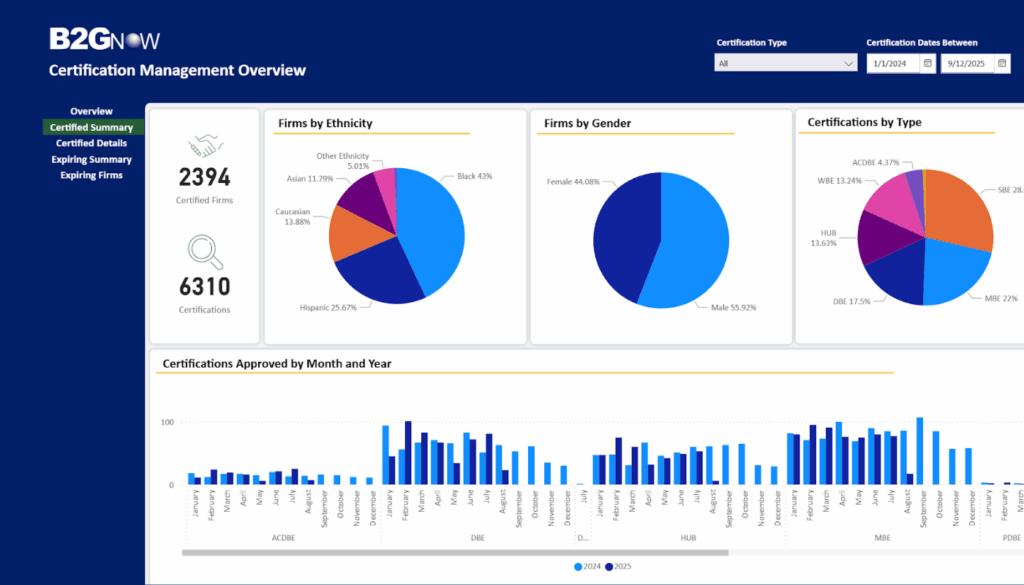
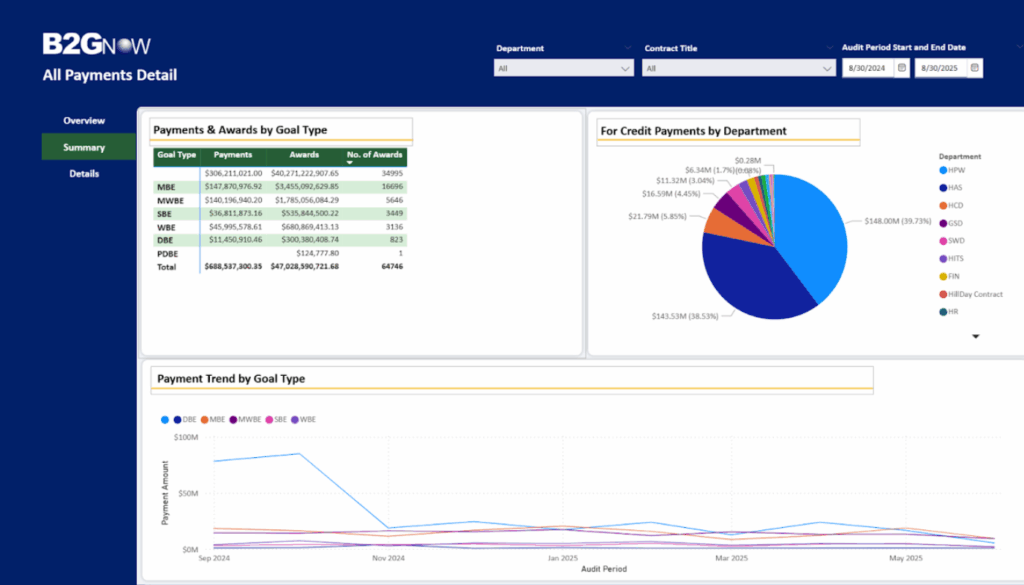
B2Gnow’s vendor management solution helps manage this data in one central platform, making complex programs easier to oversee with more transparency. Now, B2Gnow users can take reporting a step further with Power Analytics, a modern reporting and visualization tool that turns complex compliance data into clear, actionable insights. Built on Microsoft Power BI, Power Analytics connects information across B2Gnow for a complete view. This gives organizations a single, comprehensive view to support faster, smarter decision-making.

Manage and track vendors, understand availability, and identify opportunities to expand outreach.

A Smarter Way to Report

Traditional compliance reporting often requires piecing together multiple spreadsheets, reports, or siloed systems to get the full picture. This process can be time-consuming, leave room for errors, and slow down important decisions.

Power Analytics streamlines reporting, allowing users to access a library of pre-built bundled reports that instantly bring data together. Whether tracking subcontractor participation, reviewing certified vendor data, or monitoring payroll compliance, staff get the insights they need quickly and accurately without manually combining data from different sources.

Key Features

  • Bundled Reports – Immediately access prebuilt reports, including Contract Compliance Audits, Payment Details, and Certification Overviews.
  • Unified Data – Connects information across B2Gnow modules for a complete program view.
  • Interactive Dashboards – Filter, slice, and drill down into data to uncover trends and issues.
  • Visual Clarity – Turn complex numbers into charts, maps, KPIs, and more.
  • Shareable Insights – Unlimited read-only access makes it easy to keep teams and stakeholders informed.
  • Flexible and Customizable – Built on Microsoft Power BI, so internal teams or consultants can get the reports they need to better manage their projects.

Creators can copy and then modify bundled reports to deliver customization for specific needs.

Designed for Today and Tomorrow

Compliance requirements are constantly changing, and organizations need tools that can keep pace. Power Analytics provides real-time visibility into programs, enabling staff to make decisions with confidence.

Today, it enhances reporting for B2Gnow users. Tomorrow, it will include eComply Prevailing Wage and BlackCat Grant Management data, providing a broader, unified view of compliance performance across programs.

Turn Your Data into Decisions

With Power Analytics, organizations no longer have to choose between accuracy, clarity, and speed. Unified reporting and real-time insights help strengthen oversight, improve transparency, and enable more confident decisions.

Get Started: Request a demo today
Watch Now: Power Analytics Webinar

Prevent Labor Compliance Mistakes Before They Escalate with Modern Oversight Tools

Teams managing prevailing wage and certified payroll compliance, whether in the capacity of government agencies, prime contractors, or project owners, handle a constant flow of data from contractors and subcontractors. Traditional prevailing wage reviews often require a careful examination of every line in each certified payroll report. 

From Manual Review to Automated Detection

Large projects quickly produce thousands of records across multiple contractors and trades, making manual review impractical. Automated solutions address this challenge by reviewing payroll submissions against preset rules, flagging errors such as misclassified workers, incorrect pay rates, or incomplete records, as soon as the payrolls are submitted. This allows compliance teams to focus on resolving issues rather than searching for them.

Real-Time Alerts and Escalation Workflows

Modern compliance tools allow organizations to create customized alert workflows. A minor issue, such as a missing apprentice ratio report, might trigger a contractor notification, while a serious problem, like repeated underpayment of fringe benefits, could automatically escalate to a compliance officer.

Alerts can be prioritized by severity, frequency, or financial impact. Program managers can quickly identify which contractors or projects require additional attention. SaaS solutions like eComply allow teams to customize rules and workflows according to local regulations and internal policies.

Identifying Common Red Flags

Technology can help detect high-risk patterns in certified payroll data, including:

  • Late or missing payrolls
  • Wage rate mismatches
  • Fringe benefit discrepancies
  • Duplicate worker IDs
  • Unusual overtime patterns
  • Incomplete subcontractor hierarchies

Detecting these issues early prevents minor errors from evolving into audit findings or payment disputes.

Leveraging Analytics for Program Insights

Beyond identifying compliance issues, automated systems generate analytics that reveal systemic trends. Compliance teams can track which contractors or trades frequently trigger alerts, identify recurring training needs, and measure the effectiveness of their programs. Dashboards display metrics such as on-time submission rates and average resolution times, providing oversight that manual review cannot match.

Contractors benefit as well. Automated validation helps catch errors before submission, reducing resubmission cycles and payment delays.

Implementing Intelligent Compliance Monitoring

For organizations adopting automated monitoring, several best practices help ensure success:

  1. Define clear validation rules. Review policies and wage determinations to determine which tasks should be automated and which should be manually reviewed.
  2. Engage stakeholders early. Include both compliance staff and contractors to ensure rules are practical and transparent.
  3. Set reasonable thresholds. Start with high-impact checks to avoid alert fatigue.
  4. Use analytics to guide training. Focus staff development where patterns of recurring errors emerge.
  5. Maintain audit readiness. Retain alert histories, corrective actions, and correspondence for future review.

Technology complements human judgment, enabling staff to focus on interpretation and enforcement rather than routine data checks.

Moving Toward Proactive Oversight

Labor compliance programs are under increasing scrutiny as federal and state funding grows. Manual review alone cannot keep pace with today’s data volume and complexity. By implementing automated validation, configurable alerts, and analytics dashboards, organizations can shift from reactive enforcement to proactive oversight.

Solutions such as eComply demonstrate how technology supports this transition, enabling organizations to detect issues early, streamline workflows, and enhance accountability. Data-driven compliance is no longer optional; it is becoming the standard for effective labor oversight.

Request a demo and discover how eComply can transform your labor compliance program with automated validation and proactive oversight.

Maximizing Impact: A Guide to Grant Management Software for State DOTs

Grants are a vital source of funding for state and local government agencies, but managing them effectively demands more than just distributing dollars – it requires oversight, accountability, and alignment with program goals. For grantmaking agencies, such as State Departments of Transportation, manual processes, disparate systems, and fragmented data create challenges in tracking applications, evaluating proposals, monitoring awards, and ensuring funds are used as intended. These inefficiencies can slow down decision-making, increase administrative burden, and heighten the risk of reporting errors or noncompliance with federal and state requirements.

Grant management software, such as B2Gnow’s BlackCat solution, streamlines the entire grant and data management lifecycle by centralizing applications and recipient data, automating review and approval workflows, tracking performance outcomes, and generating compliance-ready reports. This not only increases efficiency and transparency but also strengthens trust with stakeholders, improves the agency’s ability to measure impact, and ensures that funding delivers maximum benefit to the communities it serves.

What Is Grants Management Software

A grants management software solution, like the B2Gnow BlackCat suite, are comprised of powerful systems – BlackCat Transit, BlackCat Aviation, BlackCat Rail, and BlackCat Flex – designed to streamline the entire grant and data management lifecycle for public sector programs, from the initial application to final closeout. The powerful systems provide a unified, secure platform to manage grants, projects, and financial information, replacing outdated tools like spreadsheets and paper forms. By digitizing paperwork and centralizing data, these solutions help to automate key processes, track deadlines, and ensure compliance with federal and state regulations.

When Do You Need To Invest In Grants Management Software?

State Departments of Transportation, and other state agencies, should consider investing in grants management software when current processes are causing significant challenges. For example, if agencies are relying on disconnected spreadsheets and manual communication to manage multiple grant programs, the result is likely inefficiencies, missed deadlines, and increased compliance risk. State DOTs and other public agencies face increasing pressure to manage a variety of grants and report on them accurately. Without a cloud-based, centralized system, these challenges can put critical safety and maintenance priorities at risk.

How To Know When It’s Time To Invest In Grants Management Software?

It’s time for State DOTs and other state agencies to invest in a grants management solution when these common pain points infiltrate daily operations:

  • Disparate Systems & Manual Processes: Data is scattered across different systems, email chains, and spreadsheets, making it difficult to get a complete picture of programs.
  • Reporting Errors & Delays: Inconsistent data formats and manual entry lead to reporting errors and slow down approvals.
  • Lack of Transparency: Without a centralized platform, it’s hard to track where funds are going, which can undermine confidence in funding allocations.
  • Difficulty with Compliance: Meeting strict federal and state regulations, like those for the FAA, FRA, DBE, and NTD, becomes a major administrative burden and mounting compliance risk.
  • Inability to Scale: Current tools limit the ability to expand programs or respond to new community priorities.

How To Get Agency Buy-In To Invest In The Software?

Building a case to invest in grants management software requires a strategic approach. For example, State DOTs and other public agencies should focus on how the solution directly supports efficiency, compliance, and strategic outcomes. Key points to highlight include:

  • Maximize Funding Impact: Ensure every awarded dollar is tracked, monitored, and tied to measurable outcomes.
  • Increase Efficiency and Reduce Errors: Eliminate manual processes and reduce staff time spent on application reviews, reporting, and compliance tasks.
  • Strengthen Compliance: Meet federal and state reporting requirements with automated, audit-ready reporting tools.
  • Improve Transparency:  Centralize data for clear visibility into application status, fund distribution, and project performance.
  • Enable Data-Driven Decisions: Use real-time insights and dashboards to prioritize high-impact projects and allocate resources effectively.

In order to get buy-in from leadership, it’s critical to focus on impact, benefits, and clearly demonstrating the value.  A purpose-built solution designed for state DOTs can reduce administrative burden, optimize funding decisions, and enhance transparency.

How To Show The ROI From Grants Management Software?

Showing a clear return on investment (ROI) from grants management software is crucial. While some benefits are qualitative, agencies can translate them into quantitative metrics. For example:

  • Time Savings: Quantify the hours saved by automating tasks like application management, reporting, and notifications. A cloud-based solution like BlackCat, for example, reduces manual effort and frees up staff to focus on more strategic, impactful projects.
  • Risk Mitigation: Calculate the potential costs of non-compliance, such as audit fines or funding loss. A system that ensures audit-readiness and provides built-in compliance tracking can be a significant cost-saver. 
  • Improved Decision-Making: Explain how real-time dashboards and reports lead to better funding decisions.

What To Look For When Researching Grants Management Software?

For State Departments of Transportation (DOTs), a grants management solution should streamline the entire grant lifecycle, from application and review to award management and closeout. The system must ensure compliance with federal and state regulations. It should centralize all data to provide clear visibility into funding distribution and automate workflows to reduce manual effort and errors. 

An ideal solution includes robust reporting tools for audit-ready documentation, supports collaboration between internal teams and external stakeholders, and offers configurable dashboards for real-time performance tracking. The system should also integrate easily with existing financial and project management systems.  Ultimately, the right solution will help DOTs maximize the impact of grant funding, improve transparency, and make data-driven decisions

Final Thoughts
Investing in a grant management solution is a strategic decision that can transform how agencies operate. By moving away from outdated manual processes and embracing a centralized, modern platform, agencies can increase efficiency, reduce risk, and focus on the projects that truly make an impact on the communities they serve. B2Gnow, with its BlackCat suite of products, has over 25 years of experience in grant and data management and has managed over $50 billion in grant awards across more than 40 implementations in 27 states. Choosing a trusted, purpose-built solution can help agencies deliver more, faster, and with greater confidence. Learn more and request a demo of B2Gnow’s BlackCat solution.

What is Certified Payroll Reporting? A Beginner’s Guide

What Is a Certified Payroll Report?

A certified payroll report, or “CPR” as it is more generally called, is a specialized report that contractors and subcontractors are required to submit when working on federally funded, federally assisted, state, or local projects that are subject to the Davis-Bacon Act or state/local prevailing wage laws. The report provides a detailed account of employee wages and hours, ensuring that workers are being paid the correct prevailing wage and benefits as required by law. It’s called “certified” because the person preparing it must sign a statement of compliance, certifying under penalty of perjury that the information is accurate and that all workers have been paid in accordance with the regulations.

Why Does Certified Payroll Reporting Matter?

Certified payroll reporting is a critical part of ensuring fair competition among contractors and protecting workers from being underpaid. It provides government agencies and project owners with a mechanism to monitor and enforce prevailing wage laws, which helps to maintain a level playing field for all bidding contractors. For contractors, accurate and timely reporting is essential for maintaining a good reputation and avoiding financial and legal repercussions.  

When Is Certified Payroll Required?

Certified payroll is required for many public works projects, including those funded or assisted by federal programs as well as projects covered under state and local prevailing wage laws. This can include construction, alteration, or repair of public buildings or public works. The requirement applies to both prime contractors and all levels of subcontractors involved in the project. Certified payroll reports must typically be submitted on a weekly basis.

How Are Certified Payroll Reports And The Davis-Bacon Act Related?

The Davis-Bacon Act (DBA) is a foundational piece of legislation that mandates that contractors and subcontractors on federally funded construction projects valued at over $2,000 must pay their laborers and mechanics no less than the local prevailing wages, including fringe benefits. Certified payroll reporting is the primary tool used to demonstrate compliance with the wage and benefit requirements set forth by the Davis-Bacon Act.

Further, many states and municipalities have passed their own “Little Davis-Bacon” or local prevailing wage laws that mirror these federal requirements. In those cases, certified payroll reporting plays the same role – it’s the official record that contractors and subcontractors are complying with state or local prevailing wage standards. Additionally, many of these state and local prevailing wage counterparts have their own thresholds and requirements that must be followed.  Whether at the federal, state, or local level, certified payroll reporting  is the primary tool agencies and project owners use to verify wage compliance on public works projects.

What Is The Difference Between A Certified Payroll Report And Regular Payroll Report?

While both certified payroll and regular payroll reports are used to calculate wages and withholdings, they serve distinct purposes and have different requirements. For example, regular payroll applies to all employees in the private sector for general business operations. Certified payroll reports, on the other hand, is specifically for employees working on public works projects that fall under federal, state, or local prevailing wage laws. Additionally regular payroll adheres to standard tax laws and general labor regulations.

Certified payroll reports, however, have much more stringent reporting requirements, including the submission of a signed statement of compliance to the contracting government agency. A generic CPR template won’t always be enough, as different states and localities may have their own laws and formats they will accept.  Furthermore, differences are also found in the wage rates.  For example, the wage rates for CPR compliance are not determined by the employer, but are instead based on the prevailing wage rates for a specific geographic area and job classification, as determined by the U.S. Department of Labor (and their state counterparts).

How Long Do I Have To Maintain Certified Payroll Report Records?

The Davis-Bacon Act (DBA) requires record retention for at least three years after the completion of a project. An auditor could request these records at any time.  State and local prevailing wage laws, on the other hand, often have different requirements for certified payroll recordkeeping. For example, the requirement is five years in California and six years in New York.  The bottom line is, contractors need to follow federal Davis-Bacon rules and the stricter state or local requirements, if applicable. 

What Are The Penalties For Non-Compliance With Certified Payroll Reporting?

The penalties for non-compliance with certified payroll reporting are severe and can have significant financial and reputational consequences for both agencies and contractors. For example, non-compliant contractors may be required to pay back wages, and they can face hefty fines.  Further, non-compliance can lead to legal issues and debarment from future federal or other public contracts. Finally, violations are often a matter of public record, which can lead to reputational damage that affects a company’s ability to secure future projects.

Final Thoughts
Certified payroll reporting is a complex, but essential, part of the public works contracting industry. It is a critical component of labor compliance that protects workers and ensures fair competition. While manual processes can make certified payroll reporting tedious and prone to errors, a modern, cloud-based solution like eComply is designed to simplify and automate these processes. With features like real-time tracking, automated review of CPRs, wage determination updates, and seamless data integration, eComply helps agencies and contractors to minimize administrative burdens and reduce the risk of non-compliance, allowing these organizations to focus on the work itself.

For agencies, it provides a verifiable framework for oversight, allowing agencies to confidently manage a network of contractors while upholding legal and ethical standards. This transparency builds trust with stakeholders and protects the agency’s reputation. For contractors, eComply is more than just a requirement; it’s a competitive advantage.

By demonstrating a proactive commitment to compliance, contractors can win more contracts and avoid costly penalties. Additionally, it simplifies a contractor’s operations by centralizing all necessary documentation, training, and reporting, turning a potential administrative burden into a streamlined system for growth. Ultimately, embracing eComply isn’t just about following the rules – it’s about creating a more efficient, secure, and trustworthy environment for everyone involved. Request a demo and learn more about how eComply can support your organization by automating and streamlining certified payroll and labor compliance.

What Is the Davis-Bacon Act? Federal Prevailing Wage Law Explained

The U.S. Department of Labor (DOL) plays a crucial role in overseeing federal worker wages, safety, and utilization for contracts receiving federal funding. Among its many responsibilities, the Davis-Bacon and Related Acts (DBRA) stand out as a cornerstone for fair labor practices in public works.

What Is The Davis-Bacon Act?

The U.S. Department of Labor (DOL) oversees federal worker wages, safety, and utilization for contracts receiving federal funding. The Davis-Bacon and Related Acts (DBRA) applies to contractors and subcontractors working on construction, alteration, or repair (including painting and decorating) of public buildings or public works and says that contractors must pay their laborers and mechanics employed no less than the local prevailing wages and fringe benefits for corresponding work on similar projects in the area. The DBRA applies to wages, fringe benefits, and overtime. Most states have implemented their own version of the Davis-Bacon Act, which are often referred to as Little Davis-Bacon. 

Why Is The Davis-Bacon Act Important?

This act is essential because it guarantees that laborers working on public contracts receive fair pay according to local wage rates. This prevents exploitation, helps workers contribute fairly to their communities, and ensures a level playing field. Non-compliant contractors may face penalties and fines for not following prevailing wage requirements. eComply Labor Compliance solution offers a digitized approach for organizations and their prime contractors to track and manage contracts, subcontractors, workforce utilization, and wages by project, providing a consistent and accurate way to deliver reports as required by regulations.

What Is The Purpose Of The Davis-Bacon Act?

The main goal of the Davis-Bacon Act is to establish clear rules for public agencies and their contractors about worker wages on public infrastructure projects. Passed during the Great Depression, it aimed to stop contractors from hiring out-of-town workers at lower wages, which lowered local wage levels. By safeguarding workers, promoting fair competition, and supporting skilled labor, the act continues to play an important role.

Who Enforces The Davis-Bacon Act?

The Davis-Bacon Act is enforced by the US Department of Labor’s Wage and Hour Division (WHD). The WHD conducts routine audits and investigates complaints filed against contractors to identify violations. In states with “Little Davis-Bacon” acts, the equivalent state department, such as California’s Department of Industrial Relations (DIR), handles enforcement.

How Are Davis-Bacon Wage Rates Determined?

The Department of Labor’s Wage and Hour Division continuously reviews and monitors wages across the country. They maintain the SAM.gov website, a valuable resource where agencies and contractors can search for wage information. Several factors, including average wages in the region, craft and work classifications, job titles, and historical local wages, determine prevailing wages.

Are Davis-Bacon Wages Adjusted For Inflation?

Yes, Davis-Bacon wages are adjusted for inflation. Typically, these wages are updated twice a year. However, in instances of significant changes in labor market conditions, updates can occur more frequently to accommodate those shifts.

Streamline Your Compliance with eComply

Navigating the complexities of the Davis-Bacon Act and ensuring compliance can be a major challenge for organizations and their contractors. B2Gnow’s eComply Labor Compliance solution provides a digital platform for tracking and managing contracts, subcontractors, workforce utilization, and project-specific wages. This automation ensures accurate and consistent reporting that meets regulatory standards, while also keeping wage rates up-to-date with real-time updates, reducing the risk of a Department of Labor audit.

To learn how eComply can streamline your labor compliance processes and help your organization stay audit-ready, request a demo today.

Revolution in Motion: AI Content Generation Transforms B2Gnow Outreach Communication

Introducing AI Content Generation in B2Gnow Outreach

Writing personalized outreach messages doesn’t have to be time-consuming. In 2024, we launched the first AI-powered feature in our B2Gnow Outreach & Events module, Outreach Content Assistant, making it faster and easier to create effective, professional communications to all of your vendors.

How It Works

Within the Content tab of the Outreach & Events module, a new “Generate Outreach Content” button unlocks a simple, guided form. From there, the AI handles the heavy lifting enabling you to:

  • Choose a tone for the message (formal, friendly, urgent)
  • Select the message length (short or detailed)
  • Describe what the message should include (event info, deadlines, goals)

The result? An AI-generated email draft tailored to your needs that is delivered instantly. You can:

  • Regenerate the draft message with new input
  • Copy it directly into your campaign
  • Manually edit and refine the content
  • Save the message to use again later

It’s flexible, editable, and built for speed, helping your team spend less time writing and more time engaging.

Note: This feature is available today, but it’s not enabled by default. Contact B2Gnow Customer Support via the Help Center to have it turned on for your organization.

Why It Matters

The Outreach Content Assistant is part of our broader effort to bring AI into compliance workflows in practical, high-impact ways. By reducing time spent on outreach prep, your team can:

  • Engage vendors faster
  • Increase response rates
  • Maintain consistent messaging
  • Focus on strategy over formatting

AI won’t replace the human touch, but it can make your outreach process significantly more efficient.

What’s Next?

To help shape the future of AI in our platform, we’re actively working with customers, including members of our Customer Advisory Board, to better understand their challenges and identify where AI can make the greatest impact. If you’d like to share your feedback or are interested in joining the Customer Advisory Board, please contact B2Gnow Customer Support through the Help Center. To learn more or get started with B2Gnow, please request a demo.

Written by John Garay, Vice President of Product, B2Gnow